 vulncheck
571c5de3cc
vulncheck
571c5de3cc
router.push('/') performs client-side navigation, which causes AppShell
to mount and fire /auth/me before the browser has committed the
Set-Cookie from the login response. The result was a 401 on the first
/auth/me, bouncing the user back to /login as if the credentials were
wrong; only after a couple of retries (and an eventual hard reload)
would the cookie be picked up and the dashboard load.

Switch to window.location.href = '/' so the browser performs a full
navigation. The cookie jar is guaranteed to be committed before the new
page loads, so the very first /auth/me succeeds.

VulnCheck Dashboard
Open Source Vulnerability Management for Wazuh
Prioritize, verify, and resolve vulnerabilities with automated workflows and AI-powered analysis.





Overview
VulnCheck is a self-hosted vulnerability management dashboard that integrates with Wazuh to provide a centralized view of your infrastructure's security posture. It automates vulnerability discovery, SLA tracking, patch verification, and reporting -- backed by AI analysis from multiple providers.
Key capabilities:
- Sync vulnerabilities and assets from Wazuh automatically
- AI-powered CVE analysis with remediation recommendations
- SLA policy enforcement with automated email alerts
- Automated patch verification via Wazuh Syscollector rescans
- Role-based access with full audit trail
- PDF/CSV reporting for compliance workflows
Features
Vulnerability Management
- Filter, sort, and search across all detected CVEs
- Bulk status updates, user/group assignment, and deferral workflows
- Priority scoring (0-100) dynamic formula:
- Base Score: (CVSS Score + Exploit Bonus) * Asset Criticality Factor
- Exploit Bonus: +4 (Exploit Available), +2 (Exploitable)
- Asset Criticality: Factor 0.8 (Low) to 2.0 (Critical) based on Group Policy SLA
- Age Penalty: +20 points max (Linear increase over 30 days)
- Status tracking: Open, Patched, Pending Verification, Patch Failed, Accepted Risk, False Positive, Deferred
- Per-vulnerability notification suppression
Wazuh Integration
- Auto-discover agents and sync vulnerability data
- Trigger Syscollector scans directly from the UI
- Automated patch verification: mark as patched, VulnCheck rescans and confirms
- Deduplication of CVEs per asset
AI-Powered Analysis
Supports multiple AI providers for CVE analysis, threat assessment, and remediation guidance:
| Provider | Models |
|---|---|
| OpenAI | GPT-5.2, GPT-4.1, o3, o3-mini |
| Anthropic | Claude Opus 4.5, Sonnet 4.5, Haiku 4.5 |
| Google Gemini | Gemini 3 Pro, 3 Flash, 2.5 Pro |
| DeepSeek | V3, R1 (Reasoner) |
| Ollama (local) | Llama 3.3, Mistral, CodeLlama, Phi-4 |
| Infomaniak | Llama 3, Mistral 3, Mixtral, Granite, Qwen 3, Gemma 3n |
Ollama in Docker: Use
http://host.docker.internal:11434/v1as the Base URL when running VulnCheck in Docker with Ollama on the host.
Automated Workflows
- Scheduled scans with configurable intervals (hourly, daily, weekly) or cron expressions
- SLA breach monitoring runs hourly, sends email alerts to assigned users/groups
- Patch verification triggers a Wazuh rescan and updates status automatically
Notifications
- Customizable HTML email templates for SLA breaches and new vulnerability alerts
- Live preview of email templates with sample data
- SMTP configuration with test email functionality
- Full notification history with status tracking (Sent, Failed, Suppressed)
Performance Note: Avoid sending large batches of emails simultaneously. Most SMTP providers (especially Proton, Gmail, Outlook) enforce strict rate limits (~10-20 emails per minute). Exceeding these limits may result in "too many connections" errors or temporary blocks. SLA breach notifications are throttled to 1 email per vulnerability per 24 hours by default.
Asset Management
- Auto-discovery from Wazuh agents or manual creation
- Bulk assignment to users, groups, and SLA policies
- Track OS, location, owner, and scan history per asset
SLA Policies
- Define severity-based remediation windows (e.g., Critical: 2 days, High: 7 days)
- Assign policies to assets
- Automatic breach detection with throttled email alerts (1 per 24h per vulnerability)
Reporting
- Executive summary PDF with severity breakdown and compliance metrics
- CSV export of all vulnerabilities with full metadata
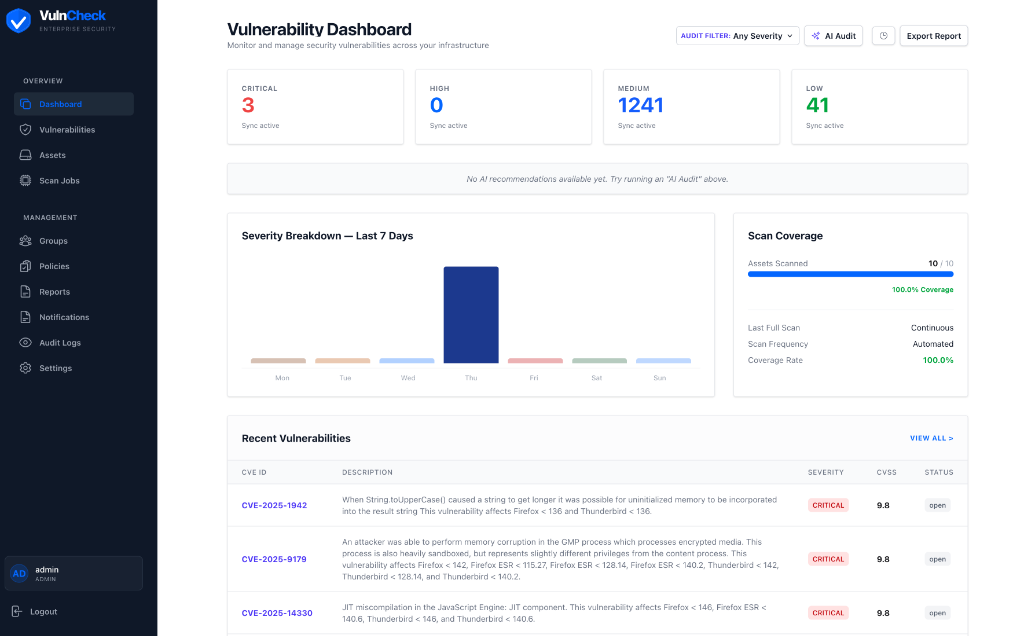
- Dashboard with real-time statistics, trends, and AI prioritization
Security
- JWT authentication with role-based access control (Admin, Editor, Readonly)
- Bcrypt password hashing with account lockout
- Comprehensive audit logging (who changed what, when)
- Security headers (CSP, HSTS, X-Frame-Options)
- Rate limiting on API endpoints
Role-Based Access Control (RBAC)
Three roles with hierarchical permissions: Admin > Editor > Readonly
| Action | Readonly | Editor | Admin |
|---|---|---|---|
| View vulnerabilities, assets, reports, dashboards | ✅ | ✅ | ✅ |
| View scan history, notification history | ✅ | ✅ | ✅ |
| View AI analysis history | ✅ | ✅ | ✅ |
| Edit vulnerabilities (status, assign, defer, reopen) | ❌ | ✅ | ✅ |
| Trigger Wazuh sync and scans | ❌ | ✅ | ✅ |
| Run AI analysis on vulnerabilities | ❌ | ✅ | ✅ |
| Create/Edit assets | ❌ | ✅ | ✅ |
| Edit SLA policies | ❌ | ✅ | ✅ |
| Manage scan schedules | ❌ | ✅ | ✅ |
| Bulk update vulnerabilities and assets | ❌ | ✅ | ✅ |
| Delete assets | ❌ | ❌ | ✅ |
| Create/Delete SLA policies | ❌ | ❌ | ✅ |
| Manage users (create, edit, delete, reset password) | ❌ | ❌ | ✅ |
| Manage groups | ❌ | ❌ | ✅ |
| Configure settings (Wazuh, AI, SMTP) | ❌ | ❌ | ✅ |
| Send test/critical notifications | ❌ | ❌ | ✅ |
| View audit logs | ❌ | ❌ | ✅ |
Screenshots
Dashboard
Quick Start
Prerequisites
- Docker and Docker Compose
System Requirements
| Resource | Minimum | Recommended |
|---|---|---|
| CPU | 2 cores | 4 cores |
| RAM | 2 GB | 4 GB |
| Disk | 10 GB | 20 GB |
Note: These requirements are for the VulnCheck application only. If running Wazuh on the same VM, add its requirements accordingly.
1. Clone the repository
git clone https://gitea.isuit.ch/vulncheck/vulncheck.git
cd vulncheck
2. Configure environment
Important: You must create a
.envfile before runningdocker compose. Skipping this step produces:required variable POSTGRES_PASSWORD is missing a value: POSTGRES_PASSWORD env var must be set
cp .env.example .env
Then edit .env and set at minimum:
-
POSTGRES_PASSWORD— must be non-empty. Replace the defaultchangemewith a strong password. -
JWT_SECRET_KEY— generate with:openssl rand -hex 32Paste the output as
JWT_SECRET_KEYin.env. -
DEFAULT_ADMIN_PASSWORD— must satisfy strength rules: ≥8 chars with uppercase, lowercase, digit, and special character. The defaultChangeMe123!passes; weaker values (likechangeme) cause the admin not to be created and login will fail. -
AUTH_COOKIE_SECURE—trueonly when serving the UI over HTTPS (e.g. behind a reverse proxy with TLS). If you are accessing the app over plain HTTP (e.g.http://server:3003during testing), set this tofalse, otherwise the browser silently drops the session cookie and login appears to do nothing — the page refreshes but the user stays logged out.# Plain HTTP / testing without reverse proxy sed -i 's/^AUTH_COOKIE_SECURE=.*/AUTH_COOKIE_SECURE=false/' .env
The .env.example ships with production-ready defaults for running behind a reverse proxy with HTTPS. Also review TIMEZONE and DASHBOARD_URL.
Verify the file exists and POSTGRES_PASSWORD is set before continuing:
grep -E '^(POSTGRES_PASSWORD|JWT_SECRET_KEY)=' .env
See
.env.examplefor all available options with descriptions.
3. Start the application
docker compose up -d --build
Run this command from the same directory as
docker-compose.ymland.env. Docker Compose auto-loads.envfrom the working directory; running from elsewhere will trigger the missing-variable error above.
Wait 2-3 minutes after deploy before opening the UI. The first start has to pull images, run database migrations, build the Next.js frontend, and warm up the backend. Hitting the login page too early can show a blank screen, a 502, or login that "looks" broken because the frontend bundle is still compiling. Watch
docker compose psuntil all three services reportUp (healthy)/Up, anddocker compose logs frontendshows✓ Ready in ….
This starts three containers:
| Service | URL | Description |
|---|---|---|
| Frontend | http://localhost:3003 |
Web UI |
| Backend | http://localhost:8022 |
API (bound to localhost only) |
| PostgreSQL | Port 5432 | Database |
Reverse Proxy (recommended)
VulnCheck is designed to run behind a reverse proxy (Nginx Proxy Manager, Traefik, Caddy, etc.):
- Point your reverse proxy to the frontend port (default
3000) - The frontend proxies all API calls to the backend internally via Docker networking
- You do not need to expose the backend port (8000) externally
Required proxy settings:
- Forward
X-Forwarded-ForandX-Real-IPheaders (for rate limiting and audit logs) - Enable WebSocket passthrough if needed
Required .env settings (already set in .env.example):
TRUST_PROXY_HEADERS=trueAUTH_COOKIE_SECURE=true(when using HTTPS)
4. First login
On first run (only if no admin exists), an admin account is created using:
DEFAULT_ADMIN_USERNAME(default:admin)DEFAULT_ADMIN_PASSWORD(default:ChangeMe123!)DEFAULT_ADMIN_EMAIL(default:admin@vulnmanager.local)
Password strength is enforced.
DEFAULT_ADMIN_PASSWORDmust be at least 8 characters and contain an uppercase letter, a lowercase letter, a digit, and a special character (e.g.!@#$%^&*). If the password fails this check, the admin is not created and login will fail. Checkdocker compose logs backend | grep -i adminto confirm.
Change the admin password immediately after first login via Settings > User Management. The default/bootstrapped credentials are not re-applied if an admin already exists.
Verify the admin was created:
docker compose logs backend | grep "Default admin user created"
If you see DEFAULT_ADMIN_PASSWORD does not meet strength requirements instead, fix the password in .env, then either restart the stack with a fresh database or use the Emergency admin reset.
Login page refreshes but nothing happens?
Almost always one of two issues:
AUTH_COOKIE_SECURE=truewhile serving over HTTP. The browser silently drops the cookie. SetAUTH_COOKIE_SECURE=falsein.envand restart the backend (docker compose up -d backend).- Frontend container was not rebuilt after pulling updates. Run
docker compose up -d --build frontend, then clear the site's cookies / use an incognito tab.
End-to-end sanity check from the server itself (replace host/port if you changed them):
curl -c /tmp/jar -s -o /dev/null -w "login: %{http_code}\n" \
  -X POST http://localhost:3003/auth/login \
  -H "Content-Type: application/json" \
  -d '{"username":"admin","password":"ChangeMe123!"}'
curl -b /tmp/jar -s -o /dev/null -w "me:    %{http_code}\n" \
  http://localhost:3003/auth/me
Both lines should print 200. If login: 200 and me: 401, the cookie is being rejected on the round-trip — recheck AUTH_COOKIE_SECURE (must be false over HTTP).
Emergency admin reset (optional)
If you lost the admin password, you can reset it via a one-time setup token.
- Set these env vars and restart the backend:
SETUP_ADMIN_TOKEN=change-me
ALLOW_ADMIN_RESET=true
- Call the endpoint (replace token & password):
curl -X POST https://your-domain.tld/auth/setup-admin \
  -H "Content-Type: application/json" \
  -H "X-Setup-Token: change-me" \
  -d '{"username":"admin","password":"NewStrongPass123!","email":"admin@vulnmanager.local"}'
- Remove
SETUP_ADMIN_TOKEN(and setALLOW_ADMIN_RESET=false) and restart.
5. Configure integrations
In Settings, configure:
- Wazuh SIEM -- API URL, credentials, and Indexer connection
- AI Provider -- Choose your provider and enter API credentials
- SMTP Email -- For SLA breach and vulnerability notifications
Architecture
┌─────────────┐     ┌──────────────┐     ┌──────────────┐
│   Browser    │────>│  Next.js 16  │────>│   FastAPI     │
│              │     │  (Port 3003) │     │  (Port 8022)  │
└─────────────┘     └──────────────┘     └───────┬───────┘
                                                  │
                                    ┌─────────────┼─────────────┐
                                    │             │             │
                              ┌─────▼────┐  ┌────▼─────┐  ┌───▼────┐
                              │PostgreSQL │  │  Wazuh   │  │   AI   │
                              │    15     │  │  SIEM    │  │Provider│
                              └──────────┘  └──────────┘  └────────┘
Tech Stack:
| Layer | Technology |
|---|---|
| Frontend | Next.js 16, React 19, Tailwind CSS 4, DaisyUI, TypeScript |
| Backend | FastAPI, SQLAlchemy 2.0, Pydantic 2, APScheduler |
| Database | PostgreSQL 15 |
| Auth | JWT (python-jose), bcrypt |
| Reports | ReportLab (PDF), CSV export |
| Deployment | Docker Compose, multi-stage builds, non-root containers |
Configuration
Environment Variables
All configuration is done via the .env file:
| Variable | Default | Description |
|---|---|---|
POSTGRES_USER |
vulnmanager |
Database username |
POSTGRES_PASSWORD |
changeme |
Database password |
POSTGRES_DB |
vulnmanager |
Database name |
POSTGRES_PORT |
5432 |
Database port |
BACKEND_PORT |
8022 |
Backend API port |
FRONTEND_PORT |
3003 |
Frontend UI port |
JWT_SECRET_KEY |
-- | Required. JWT signing key (openssl rand -hex 32) |
ENV |
production |
development or production |
TIMEZONE |
UTC |
Server timezone (e.g., Europe/Zurich) |
AUTH_COOKIE_SECURE |
auto | true for HTTPS, false for HTTP. Auto-detected from ENV if not set |
AUTH_COOKIE_SAMESITE |
lax |
Cookie SameSite policy |
TRUST_PROXY_HEADERS |
false |
Trust X-Forwarded-For for client IP (enable behind reverse proxy) |
DEFAULT_ADMIN_USERNAME |
admin |
Default admin username (first run only) |
DEFAULT_ADMIN_PASSWORD |
changeme |
Default admin password (first run only) |
DASHBOARD_URL |
-- | External URL for email notification links |
Integrations
All integrations (Wazuh, AI, SMTP) are configured through the Settings page in the UI. No additional environment variables are needed for these.
Production Deployment
Reverse Proxy Setup
VulnCheck is designed to run behind a reverse proxy. Only the frontend port needs to be reachable by the proxy -- the frontend handles all API routing internally.
Internet → Reverse Proxy (443/HTTPS) → Frontend (3003) → Backend (8022, internal)
Nginx Proxy Manager example:
- Add a new proxy host pointing to
http://<docker-host>:3003 - Enable SSL with Let's Encrypt
- No custom location blocks needed -- the frontend proxies everything
Manual Nginx example:
server {
    listen 443 ssl;
    server_name vuln.example.com;

    location / {
        proxy_pass http://127.0.0.1:3003;
        proxy_set_header Host $host;
        proxy_set_header X-Real-IP $remote_addr;
        proxy_set_header X-Forwarded-For $proxy_add_x_forwarded_for;
        proxy_set_header X-Forwarded-Proto $scheme;
    }
}
The backend port (8022) is bound to 127.0.0.1 by default in docker-compose.yml and does not need to be exposed.
Security Checklist
- Set a strong
JWT_SECRET_KEY(openssl rand -hex 32) - Set a strong
POSTGRES_PASSWORD - Change the default admin password after first login
- Set
ENV=production - Set
AUTH_COOKIE_SECURE=true(HTTPS) - Set
TRUST_PROXY_HEADERS=true(behind reverse proxy) - Configure TLS via reverse proxy
- Restrict database port (5432) to internal networks
- Block external access to ports 3003 and 8022 via firewall
Development
Local Setup (without Docker)
Backend:
# Python 3.11+
pip install -r requirements.txt
uvicorn app.main:app --reload --host 0.0.0.0 --port 8000
Frontend:
cd frontend
npm install
npm run dev
Database:
Start PostgreSQL locally or via Docker:
docker run -d --name vulncheck-db \
  -e POSTGRES_USER=vulnmanager \
  -e POSTGRES_PASSWORD=changeme \
  -e POSTGRES_DB=vulnmanager \
  -p 5432:5432 \
  postgres:15-alpine
Database Migrations
Migrations are managed with Alembic:
# Apply all migrations
alembic upgrade head

# Create a new migration
alembic revision --autogenerate -m "description"
Project Structure
vulncheck/
├── app/                    # FastAPI backend
│   ├── main.py            # Application entrypoint
│   ├── database.py        # SQLAlchemy configuration
│   ├── scheduler.py       # APScheduler (scans, SLA checks)
│   ├── models/            # SQLAlchemy ORM models
│   ├── routers/           # API route handlers
│   ├── services/          # Business logic (email, etc.)
│   ├── integrations/      # Wazuh & AI client libraries
│   └── auth/              # JWT & RBAC
├── frontend/              # Next.js application
│   ├── app/               # Pages (App Router)
│   ├── components/        # React components
│   ├── lib/               # API client, utilities
│   └── types/             # TypeScript definitions
├── alembic/               # Database migrations
├── docker-compose.yml
├── Dockerfile             # Backend container
└── frontend/Dockerfile    # Frontend container (multi-stage)
API Overview
The backend exposes a REST API at /api/v1/. All endpoints require JWT authentication unless noted otherwise.
| Endpoint Group | Base Path | Description |
|---|---|---|
| Authentication | /auth |
Login, logout, user management |
| Vulnerabilities | /api/v1/vulnerabilities |
CRUD, AI analysis, Wazuh sync, bulk ops |
| Assets | /api/v1/assets |
Inventory, assignment, bulk ops |
| Scans | /api/v1/scans |
Scan jobs, schedules |
| Policies | /api/v1/policies |
SLA policy management |
| Groups | /api/v1/groups |
User group management |
| Notifications | /api/v1/notifications |
Notification log, test email |
| Reports | /api/v1/reports |
PDF/CSV export |
| Settings | /api/v1/settings |
System configuration |
| Audit | /audit |
Audit trail (admin only) |
| Health | /health |
Health check (no auth) |
Interactive API docs are available at http://localhost:8022/docs (Swagger UI).
Contributing
Contributions are welcome. To get started:
- Fork the repository
- Create a feature branch (
git checkout -b feature/your-feature) - Make your changes
- Run tests if applicable (
pytestfor backend) - Commit and push (
git push origin feature/your-feature) - Open a Pull Request
Please open an issue first for larger changes to discuss the approach.
Roadmap
- Webhook notifications (Slack, Teams, generic)
- LDAP/Active Directory authentication
- Multi-tenant support
- Additional SIEM integrations
- Vulnerability scanning without Wazuh (standalone agent)
- Dark mode
License
This project is licensed under the GNU Affero General Public License v3.0 (AGPLv3). See LICENSE for details.
Operations Guide
Admin Account Locked Out
Accounts are locked after 5 failed login attempts and auto-unlock after 15 minutes.
# Option 1: Wait 15 minutes (auto-unlock)

# Option 2: Unlock immediately via database
docker exec -it vulnmanager-db psql -U vulnmanager -d vulnmanager -c \
  "UPDATE users SET failed_login_attempts = 0 WHERE username = 'admin';"
Reset Admin Password
# 1. Generate a new bcrypt hash inside the backend container
docker exec -it vulnmanager-backend python3 -c "
from app.auth.jwt_handler import hash_password
print(hash_password('YourNewSecurePassword123!'))
"

# 2. Update the hash in the database
docker exec -it vulnmanager-db psql -U vulnmanager -d vulnmanager -c \
  "UPDATE users SET password_hash = '<paste-hash-here>' WHERE username = 'admin';"
Alternatively, use the "Reset PW" button in Settings > User Management (requires another admin account).
Create Emergency Admin User
If all admin accounts are inaccessible:
# 1. Generate a password hash
docker exec -it vulnmanager-backend python3 -c "
from app.auth.jwt_handler import hash_password
print(hash_password('EmergencyAdmin123!'))
"

# 2. Insert a new admin user
docker exec -it vulnmanager-db psql -U vulnmanager -d vulnmanager -c \
  "INSERT INTO users (username, email, password_hash, role, is_active, is_verified, failed_login_attempts, created_at, updated_at)
   VALUES ('emergency_admin', 'admin@example.com', '<paste-hash-here>', 'admin', true, true, 0, NOW(), NOW());"
Database Backup & Restore
# Backup
docker exec vulnmanager-db pg_dump -U vulnmanager vulnmanager > backup_$(date +%Y%m%d).sql

# Restore
docker exec -i vulnmanager-db psql -U vulnmanager vulnmanager < backup_20260201.sql
Run Database Migrations Manually
Migrations run automatically on container start. To run manually:
docker exec -it vulnmanager-backend alembic upgrade head
View Logs
# All services
docker compose logs -f

# Backend only
docker compose logs -f backend

# Last 100 lines
docker compose logs --tail=100 backend
Restart Services
# Restart all
docker compose restart

# Restart only backend
docker compose restart backend

# Full rebuild (after code changes)
docker compose down && docker compose up -d --build
Check Service Health
# Container status
docker compose ps

# Backend API docs
curl -s http://localhost:8022/docs | head -1

# Database connectivity
docker exec vulnmanager-db pg_isready -U vulnmanager
Support
If you encounter issues or have questions, please open an issue in this repository.
Email Support: support-vulncheck.sq9vd@passmail.net
Support the Project
If VulnCheck is useful to you, consider buying me a coffee! ☕

Disclaimer
USE AT YOUR OWN RISK. This software is provided "as is", without warranty of any kind, express or implied, including but not limited to the warranties of merchantability, fitness for a particular purpose, and noninfringement.
In no event shall the authors or copyright holders be liable for any claim, damages, or other liability, whether in an action of contract, tort, or otherwise, arising from, out of, or in connection with the software or the use or other dealings in the software.
This software is intended for authorized security testing and vulnerability management only. Users are solely responsible for ensuring compliance with all applicable laws and regulations. The authors assume no liability for misuse or any damages resulting from the use of this software.